
 ReadyBoost is a disk caching technology included in Windows that uses flash memory to boost your system performance. It can use any form of flash memory such as a USB 2.0 drive, SD card or CompactFlash.
ReadyBoost functions as a complement for SuperFetch, giving SuperFetch another place to cache data. SuperFetch is a technology included in Windows Vista which prioritizes the programs you are currently using over background tasks and adapts to the way you work. This technology tracks your computer usage behavior and intelligently preloads applications into memory. This helps improving the general performance of your system and the loading times of your core applications. While SuperFetch loads by default all the necessary files into the main memory, ReadyBoost complements it by loading data into alternate storage devices such as USB 2.0 flash memory sticks.
While the USB flash drives are not as fast as the main memory, they can be faster than a hard disk drive and enabling ReadyBoost can free up some of the main memory which could be used for other tasks and applications.
How to use Windows ReadyBoost
First of all you need to have a flash memory device, such as a USB 2.0 drive. If you need to buy one then please make sure it is a fast speed drive and that it is compatible with Windows Vista as some old models have compatibility problems. If you need more guidance, check this page on ExtremeTech. They tested nine USB flash memory drives and made a list with the ones that worked and the ones that didn’t.
The device can have any amount of memory from 512 MB to 4GB. If it is bigger than 4 GB there is no problem, but ReadyBoost will use only up to 4 GB due to the limitations of the filesystem.
First you plug it in and the Autoplay menu pops up.
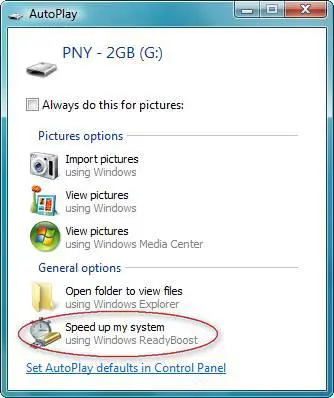
Click on Speed up my system and then select the amount of space you want to be used by ReadyBoost. The recommended amount of memory to use for ReadyBoost is one to three times the amount of memory (RAM) installed in your computer. For instance, if your computer has 512 MB of RAM and you plug in a 4 GB USB flash memory stick, you should set aside from 512 MB to 1.5 GB.
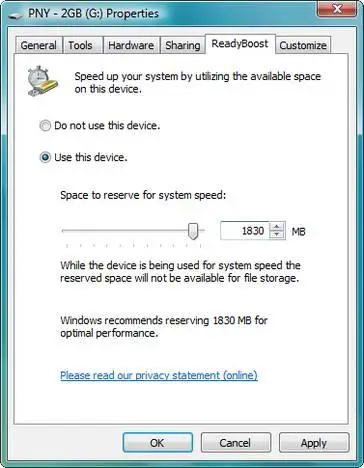
Unfortunately, there are some situations when you may not be able to use all of the memory on your storage device to speed up your computer. Some USB storage devices contain both slow and fast flash memory, and Windows can only use fast flash memory for ReadyBoost. So if your device contains both slow and fast memory, keep in mind that you can only use the fast memory portion for this purpose.
After you have selected the amount of memory for ReadyBoost, click the OK button and that’s it – ReadyBoost will start its work.
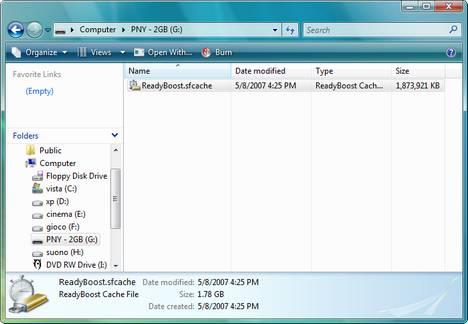
If you look on the memory stick you will see a file with the name ReadyBoost.sfcache. That is where ReadyBoost does all the caching.
Does it work?
We did not have everything that is required for a proper benchmark so we searched for reviews on the Internet. According to Tom’s Hardware and AnandTech, the performance improvement varies. The most impressive gains are made on less powerful systems with 512 MB of RAM, while on systems with 1 GB of memory and more, the gains are negligible.
We used ReadyBoost and a 2 GB USB memory stick on two systems and we noticed the same trend. On a system with 2 GB of RAM memory, ReadyBoost did not seem to provide a visible improvement but, on an older laptop with 756 MB of RAM and a slower hard disk drive, the applications started a bit faster.
Related articles:
How to configure the virtual memory in Windows Vista
Increase the performance of your SATA disk drive
How to configure your startup programs
Streamline your Startup Applications & Improve Windows Performance
Recommended articles:
ReadyBoost Q&A

hello,
i just bought a 1gb
hello,
i just bought a 1gb SD card for my pc an camera , poped it into the pc with nothing on the card , an it says that it does not have the required performace charactericits to use ready boost, i have 2gb ram , an i tryed to turn off some start up programs like windows messenger an AIM, so i have virus an spyware an a filter starting up w/ the drives of course. , is there any way i can get it to work or do i need to get a bigger card , an how big would it need to be..
Link
The problem might be generated by the fact that the card is not fast enough for ReadyBoost.
I recommend that you read this article. It might help!
reply
This is because your 1gb card is not fast enough for ready boost u need a device that is a bit faster
empty you card… and test
empty you card… and test again… i have the same problem and it worked for me…. ^^,
it is not worthy
it is not worthy to do, i tried with diferent pen drives and finally idecided to buy a new ddr2. i do not recomend it
Ready Boost is a JOKE!!!
Ready Boost is a JOKE!!! Its too Slow!!
Lets do the math……
1. Fact: Maximum data transfer rate on a memory stick 24-30mb/s MAX!!!
2. Fact: On most hard drives the data transfer rate is 80+mb/s
As you can see a hard drive is faster than a Memory Stick!!
I do not agree
This does not mean it cannot help improve the performance. If you look on several tests made by professional websites you will see that ReadyBoost delivers improvements.
ReadyBoost is not a joke…
What you forget to factor in is the seek time of the hard drive and the fact that what Readyboost helps with is caching relatively small data requests probably 100k or smaller. The seek time of a hard drive affects how fast a hard drive will start delivering (find) the data. Flash memory has virtually no seek time, probably on the order of microseconds compared with the fastest hard drive with seek times of milliseconds. Thats on the order of a 1000 times faster for flash. The flash drive can find and already have delivered a small data request before the fastest hard drive would have found the data for the same request…
Its not really a JOKE!!!
Ive
Its not really a JOKE!!!
Ive tried it and it really does
ive 4 GB pen drive and 320 GB hard disk with transfer rate of 10GB/s and it really does boost
You don’t account for seek
You don’t account for seek time. Just data transfer. When it comes to seek time, the ready boost is by far an advantage to a HDD
It works
I have a 512MB DDR2 with my laptop and I did the readyBoost function with a 4GB SanDisk Cruzer (micro) and it definately improves the speed of things. Question…will this work with 2 different flash drives? And if it does, will it work if the the two flash drives equal to more than 4GB of space?
I think that hozer is right
I think that hozer is right as my hard drive took 254 mbps per second to transfer till i put readyboost.It made it 18 mbps!!!What a rip off!
READYBOOST IS A HUGE JOKE
BAD THINGS:
1.Slows down the speed of the USB Drive
2.Uses up too much memory of your USB Flash
3.Is Really annoying when you are transferring files as that stupid cache thingys in the way.
4.Cannot be deleted unless you go to properties and click do not use.
5.Slows down the computer-let alone speeding it up!
USB Flash Drive
I purchased 3 4GB Flash Drives from HP. I plugged all three in, one at a time. The first came back with a drive letter & ask if I wanted to use it for ram boost. I said yes & it installed it as a boost with 3.8GB addition ram. The second & third ones Did the same, gave each a drive letter but stated the the cache was on the 1st one, so wouldn’t let me use the apply button, as I did on the first. Also they don’t show that they are used as a ram boost. Is there a limit to the number of flash drives that can be used for ram boost? Or, is there something else that I can do? In addition, I notied that all three drives default formatting is 32 FAT. Should I reformat these to NFTS as that is the OS formating of this system. This is a 64 bit Ultimate OS system.
Could use some help on this one.
Thanks
Hello Peter,
One flash drive
Hello Peter,
One flash drive should be more than enough for ReadyBoost. I don’t know if there is a limit to how many drives you can use for ReadyBoost, but it might work with only one USB Flash Drive.
Regarding the FAT32 – it is OK, you can continue to use it. There is no problem.
having the same problem here
having the same problem here to i think you should be able to use more than one flash drive for ran in your computer
I have 2
I have 2 usbs stuck into my laptop rite now a 1 gb and a 4 gb. i jsut stuck the first one in isntalled ready boost took it out and put in the other one and installed. Finally reinsert the previous one. Now i have like 5gb running so its possible. Hope this helps.
yes… there is a
yes… there is a limit…..
U can extend the ready boost upto 4 gb only due to operating system limtations….
Am I the only one who…
***NOTE***
L@@K at the first Paragraph sentence…
ReadyBoost is a new disk caching technology included in Windows Vista that uses flash memory to boost your system performance.
NOW…
LOOK AT THE LAST TWO (2) Paragraphs….NOTIICE ANYTHING???
Am I the only one who noticed that it says it only shows a real differences in speed on systems with 512 MB of RAM!?!?! VISTA needs and CAN have upto EIGHT on a 64-bit and 3.5 recognizable on 32-bit…
VISTA would run SO SLOWLY, even it would even boot at all, with 512 MB…
CORRECT ME IF I AM WRONG…PLZ!
[email protected]
BTW: Don’t get me wrong, I love VISTA, buuuuut,
ReadyBoost = JOKE
apparently!
Brilliant observation!
ReadyBoost will indeed make a HUGE difference on the system with 512MB of RAM but, who in their right mind would run Vista on 512MB of RAM?!? Yes, it is the minimum requirement as per Microsoft but, in all due respect, if you load Vista on a machine that is so grossly underRAMmed, it might boot but that’s just about as far as you will get, forget running ANYTHING else, period.
I run Vista Ultimate on a Intel core2duo, 4GB of RAm and Nvidia GEforce 9600 (which gives me separate, extra memory for graphics as not to “steal” from Windows). I tried to supplement the RAM with additional 4GB on a Cruizer-micro and… if there was a difference, I didn’t really notice it.
cannot get ‘readboost’ in ‘properties’
brought one today that said ‘works with windows vista’ and ‘readboost compatible’ however I cannot find the ‘readyboost’ tab when I click on properties. I do not get the autoplay screen as shown above either.
Does anyone have any ideas as to what is needed.
many thanks
Error with ReadyBoost
The thing is that I purchased a 2gb usb and I inserted it in the slot, the the window popped up. I saw the readyboost option and selected it. Then I looked at the options and cancelled without saving the changes. Well, now my frikking usb is giving morer than half of its capacity cause it wont let me save more than .800 gb and I try to look for the tab in properties for readyboost and it is not there. Also I try to disconnect and reconnect usb, the option for readyboost appears, but when I click it, it pulls up the properties window, but no readyboost tab! I hate this thing.
USB and Readyboost
Right click on the drive (DO NOT SELECT THE DRIVE) and select properties, then select the tools tab and run error-checking.
Select automatically fix file system errors and press start, this should sort the problem out for you.
If after pressing start you get a pop-up ‘schedule disk check’ this can be because you have selected the drive, select another drive then right click the USB drive.
Had that prob!
i had this prob too so i tried to format the pen and then set ready boost up again and work NP.
i love ready boost!! i have an 8 gig pen on my vista laptop with only 512MB of ram and althou vista will only use 4 of thr 8 GIG on it i find it makes a hell of a difference, also have a pc with 3 GIG of ram and the same copy of my 8 GIG usb pen set to use 4 gig the performance on it aint that different.
Vista Boost is needed?
Hi,
32-bit Vista can read up to 4 GB, can’t it? I have 3 GB RAM in my laptop. Do you think I need that ready boost?
And.. I still don’t understand. was Ready Boost is the same as “Plug and Play RAM”? Or cache?
Best Regards,
Ferdi Goh
512 memory
how do you run vista on 512mb memory anyway?
can i use 256 MB pendrive
can i use 256 MB pendrive with readyboost?
readyboost works and its simple
All the people dogging readyboost by saying it doesnt work and it slows down your comp are morons. I have a fairly new compaq laptop with 4GB ram and a slightly upgraded video chipset from the ATI. I was having a bit of lag running a video game so i decided to try the ready boost out with a 2GB SD card. Guess what?? Lag issue solved even though its recomended for systems with very low RAM. If you use it properly and know what to look for in performance then you will be happy with it.
I have just put my readyboost
I have just put my readyboost formatted Memory stick duo into my windows vista and it have definitely improved the performance for example; I use a 3D program called Cinema 4D and whenver I make a 3D text and try to make a color it always lags and it slows down my work but when i have plugged in my readyboost formatted memory stick it had improved the performance and the response time. Also alot of the applications have worked alot faster and responded better. I will get windows 8 since i heard from my friends windows 7 is just a downgrade from windows vista since because vista was not compatible with alot of things that XP could do. I think windows 8 will be good.